

In this episode, hosts Bob Dunn and Cami McNamara discuss WellPlayedWP, a unique subscription service for WordPress plugins launched by Marcus Burnette. The service focuses on innovative, user-driven plugin development, addressing gaps in existing solutions.

WordPress 7.0: Are Any of the New Features Worth Getting Excited About?
 WordPress 7.0 is shaping up to be one of the most significant releases in recent years, or simply the most ambitious rebranding of what WordPress thinks it is.
Open Channels FM: Embracing Protocols Over Products: How Open Standards Shape the Social Web
The social web’s success stems from standards and protocols like WebFinger and OAuth, which foster ownership, interoperability, and innovation, surpassing the temporary impact of individual platforms.
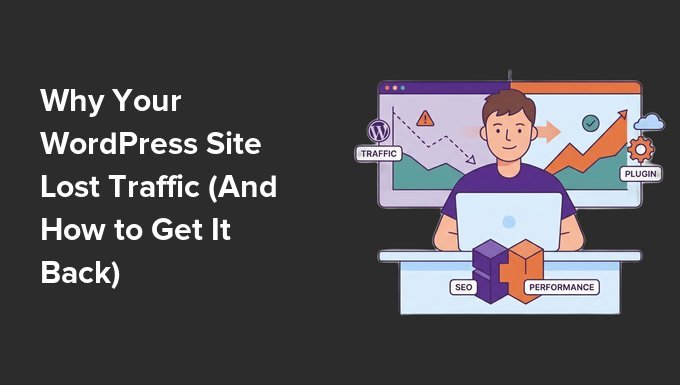
Why Your WordPress Site Lost Traffic (And How to Get It Back)
Logging into your analytics to find a sudden drop in website traffic is incredibly frustrating. Your first thought is usually, “Did I break something, or did Google penalize my site?”
At WPBeginner, we have managed high-traffic websites since 2009. We have seen just about every reason for a traffic dip, from major search engine updates to minor technical settings that accidentally block search bots.
The key to getting your traffic back on track is to calmly diagnose the issue. I’ve helped many site owners through this exact situation.
In this guide, I will walk you through my proven step-by-step process to figure out why your traffic fell and show you how to fix it.
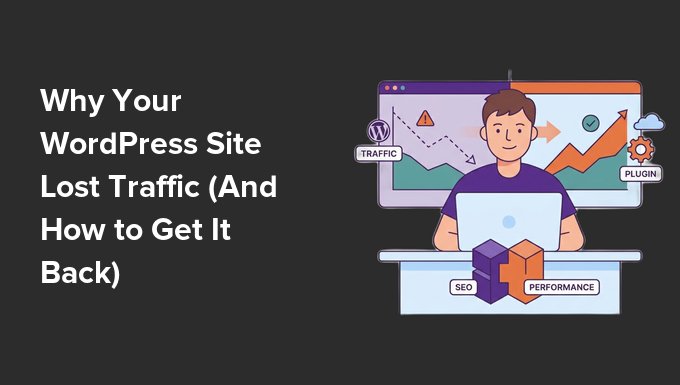
TL;DR: If your WordPress site traffic drops unexpectedly, don’t panic. Start by confirming your analytics tracking is working, then check Google Search Console for manual penalties or algorithm updates. Next, audit recent site changes, verify indexing status, and scan for malware before monitoring your recovery with site notes.
This is a comprehensive troubleshooting article. You can use the quick links below to navigate through the different topics:
- Why Did Your WordPress Traffic Drop?
- Step 1: Confirm the Traffic Drop (And Check Your Tracking)
- Step 2: Check for a Google Manual Action
- Step 3: Check for Recent Google Algorithm Updates
- Step 4: Audit for Technical Errors and Recent Site Changes
- Step 5: Verify Your Indexing Status
- Step 6: Scan for Malware and Hacked Content
- Step 7: Monitor Your Recovery With Site Notes
- Frequently Asked Questions About WordPress Traffic Drops
- Moving Forward: Keeping Your WordPress Traffic Healthy
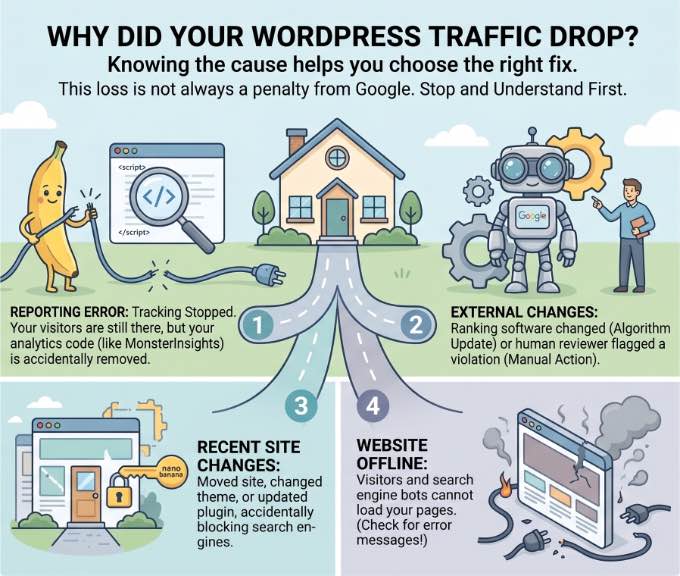
Why Did Your WordPress Traffic Drop?
When your website traffic suddenly disappears, it generally means something is preventing visitors from reaching your content or stopping search engines from seeing your site.
Before you start panicking or changing your WordPress SEO settings, you need to understand that this loss is not always a ‘penalty’ from Google.
Knowing the exact cause will help you choose the right fix without wasting time. Generally, traffic drops fall into one of three categories:
- Reporting Errors: Your visitors are still there, but your tracking has stopped working. This often happens if your analytics code is accidentally removed.
- External Changes: Google changed its ranking software (Algorithm Update) or a human reviewer flagged your site for a violation (Manual Action).
- Recent Site Changes: You recently moved your site, changed your theme, or updated a plugin that accidentally blocked search engines.
And sometimes, a traffic drop is simply the result of your website going offline. If you are seeing visible error messages on your site along with the traffic drop, then it means visitors and search engine bots cannot load your pages.
To diagnose and resolve these connection problems, you can see our guide on the most common WordPress errors and how to fix them.
Step 1: Confirm the Traffic Drop (And Check Your Tracking)
The first thing you should do is make sure the data you are seeing is accurate. Sometimes, a drop is actually just a normal seasonal dip or a tracking error.
To check this, you can use MonsterInsights. It is the best Google Analytics plugin for WordPress and makes it easy to compare your traffic over time.
We use MonsterInsights on WPBeginner to collect all our general website statistics, including engagement rates and most-visited pages.
In my experience, if you see your traffic drop to absolute zero instantly, then it is almost always a tracking health failure rather than a search engine penalty.
Check for Normal Seasonal Dips
In your WordPress dashboard, go to Insights » Reports. Click on the date selector in the top right to open the date picker.
If you are using MonsterInsights Plus or higher, then you can toggle the ‘Compare to Previous’ switch. This will automatically refresh your reports to display your current data alongside the previous period’s data.
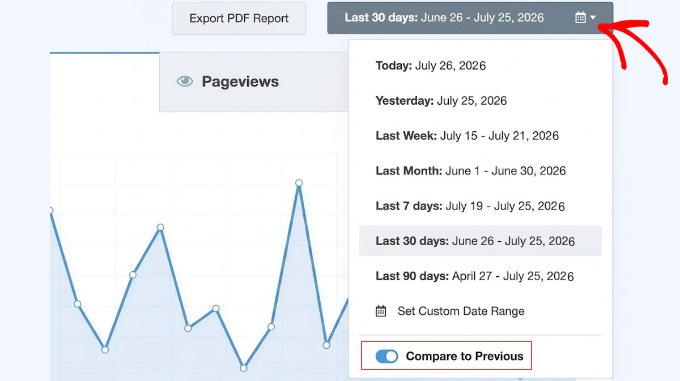
You can use the custom date range tool within this calendar to select the exact same time period from last year.
This allows you to check if your traffic usually dips during this specific season, which is a very common trend for businesses.
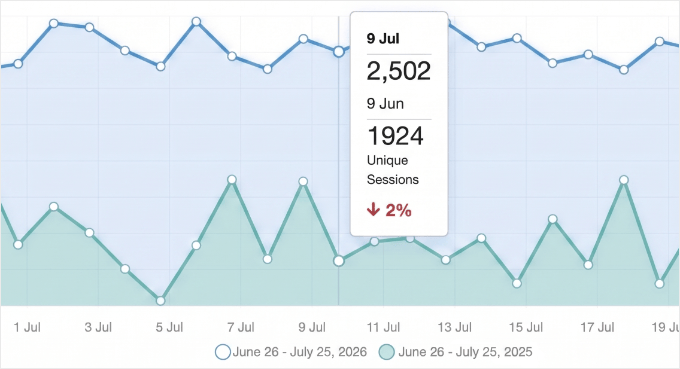
If your chart shows a similar dip during the same time last year, you are likely just experiencing normal seasonality. You don’t need to panic or make any drastic changes.
However, if this drop is entirely new, or if your traffic is significantly lower than last year, then you have a real traffic drop and should continue to the next steps to find the cause.
Check Your Analytics Connection
Alternatively, if you look at your reports and see that your traffic has dropped to absolute zero instantly, it is almost certainly a tracking health issue rather than a Google penalty.
You should navigate to Insights » Settings to make sure your Google Analytics 4 (GA4) property is still properly authenticated.
If the connection was lost, then your site is still getting visitors, but they simply aren’t being counted. This creates a false traffic drop in your reports, even though your actual search rankings haven’t changed.
In this case, you will see a large blue ‘Connect MonsterInsights’ button instead of your active profile data. Simply click this button to reconnect your account to Google Analytics and start tracking your visitors again.
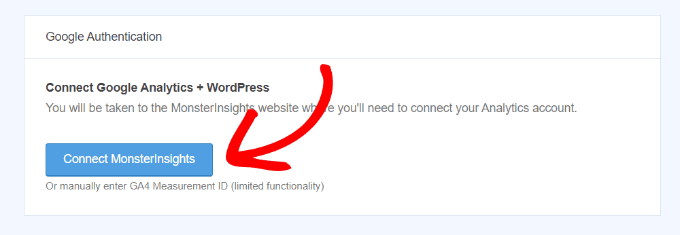
Expert Tip: Always double-check your connection to Google Analytics after major updates. Also, if your traffic dropped by exactly half, then you may have accidentally fixed a ‘double tracking’ error. If Google’s ‘Enhanced Measurement’ and MonsterInsights were both tracking at the same time, your previous numbers were artificially inflated.
If you need help setting this up from scratch, or want to make sure your settings are completely correct, see our step-by-step guide on how to install Google Analytics in WordPress.
Step 2: Check for a Google Manual Action
If your tracking is working correctly but your traffic has still dropped, then the next step is to check if Google has manually penalized your site. A ‘Manual Action’ happens when a human reviewer at Google decides your site doesn’t follow their quality guidelines.
To check for this, you first need to make sure your site is connected to Google Search Console.
If you haven’t set this up yet, please see our guide on how to add your WordPress site to Google Search Console.
Once you are logged in to your account, look at the left-hand menu, scroll down to the ‘Security & Manual Actions’ section, and click on ‘Manual actions’.
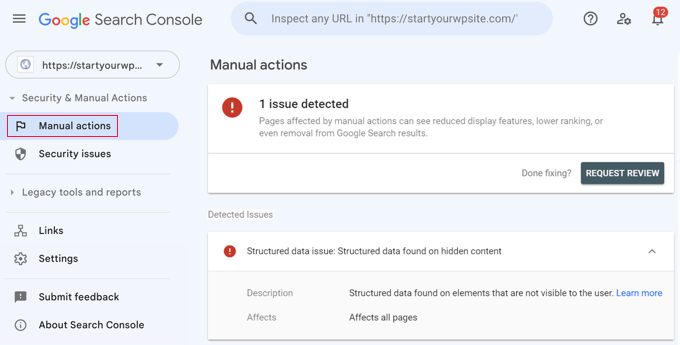
If you see a message saying ‘No issues detected’, then you are in the clear. However, if you see a specific penalty listed, Google will provide details on what is wrong, such as ‘thin content’ or ‘unnatural links’.
You should also click the ‘Security issues’ tab directly below Manual actions. This will tell you if Google has detected malware or a hack on your site.
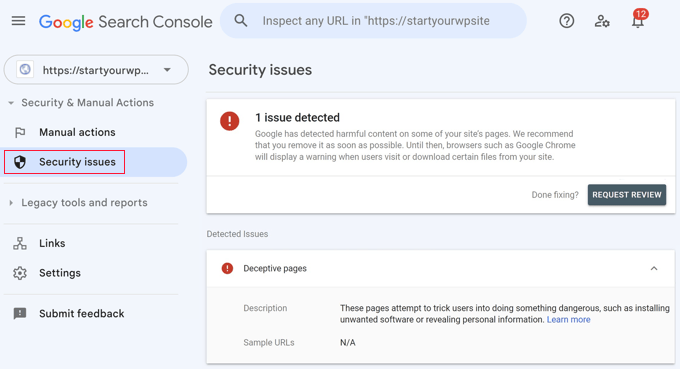
When this happens, Google often shows a bright red ‘Deceptive Site Ahead’ warning to anyone trying to visit your site, which will instantly cause your traffic to disappear.
If you find a penalty or security flag, you will need to fix the specific issues and then click the ‘Request Review’ button in Search Console.
When asking Google to reconsider your site, be sure to provide a brief ‘paper trail’ explaining the exact steps you took to clean up the issue (like removing a malicious plugin), as this greatly improves your chances of recovery.
Recovering from these penalties requires you to identify the exact cause (like toxic backlinks or hidden malware), clean your website files, and submit a thorough review request to Google.
For a complete walkthrough on how to handle this cleanup process, see our guide on what the Google blacklist is and how to fix it.
Step 3: Check for Recent Google Algorithm Updates
Unlike manual actions, Google algorithm updates are automated. Google frequently changes its ranking algorithm to improve search results, and these updates can cause your rankings to shift overnight.
The easiest way to see if an update hit your site is by using All in One SEO (AIOSEO). It is the best SEO plugin for WordPress and includes a powerful Search Statistics feature (available in the Elite plan) that overlays Google update dates directly onto your traffic reports.
Expert Tip: The Search Statistics feature that overlays Google update dates in AIOSEO is exclusive to the Elite plan. For basic on-page SEO analysis, the free version is great, but for this level of historical trend analysis, you’ll need the advanced tier.
To see this, go to All in One SEO » Search Statistics in your dashboard. On the ‘SEO Statistics’ chart, look for small vertical lines with a Google icon.
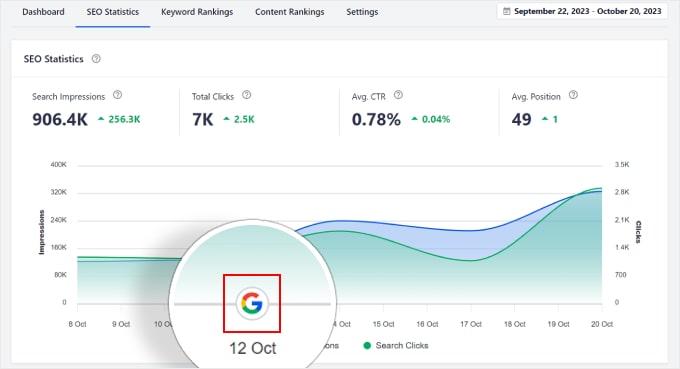
You can actually click these markers to read a summary of what that specific core update targeted.
If a traffic drop happens on the exact same day as one of these markers, then your site was likely affected by that specific update.
Since we switched all our brand websites to All in One SEO, we have relied on these search statistics to monitor our performance. We use the ‘Google Update’ markers on our own charts to quickly identify if a ranking shift aligns with a core algorithm change.
Then, we simply scroll down to AIOSEO’s Content Performance table to see exactly which of our posts lost rankings.
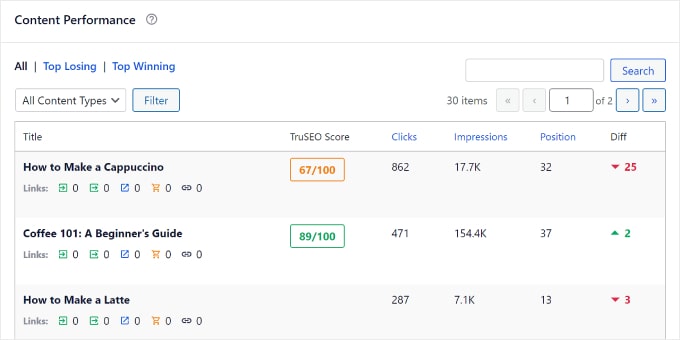
This allows us to pinpoint the cause and react quickly, saving weeks of uncertainty and lost traffic.
Unlike manual actions, you cannot submit a review request to Google for an algorithmic penalty.
To recover, you must identify what the update targeted (such as ‘thin content’ or ‘spammy links’), then rewrite the affected pages to be more helpful and wait for Google’s algorithm to naturally reward your improvements.
For a complete walkthrough on setting up these tracking reports, see our guide on how to monitor Google algorithm updates in WordPress.
Once you have identified the drop, you can follow our step-by-step recovery plan in our guide on how to recover a WordPress site from a Google search penalty.
Related Guide: You may also be receiving less traffic because more people are using AI search to get information. For tips on how to fix this, see our guide on how to optimize your content for AI search overviews.
Step 4: Audit for Technical Errors and Recent Site Changes
If your drop isn’t related to a Google update, then it is often caused by a recent change you made to your own site. This is especially common after a WordPress site migration, a theme change, or a major plugin update.
Expert Tip: Before making any major site changes like a theme switch or plugin update, always test them on a staging site first. This lets you catch potential issues that could cause traffic drops without impacting your live website.
Verify Search Engine Visibility
First, you should review the ‘Search engine visibility’ setting.
Sometimes developers or site owners accidentally select this box while working on a site and forget to uncheck it when they go live.
Go to Settings » Reading and look at the ‘Search engine visibility’ option.
If the box next to ‘Discourage search engines from indexing this site’ is checked, that is likely the cause of your traffic drop. You will need to uncheck this box immediately and click the ‘Save Changes’ button.
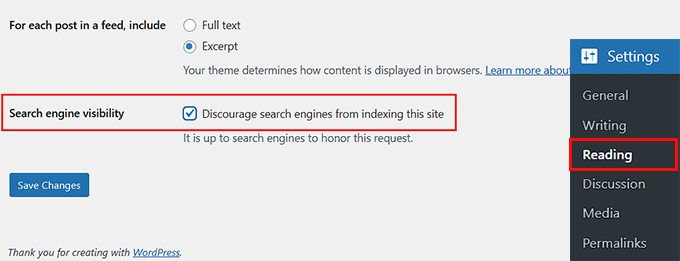
Keep in mind that once unchecked, it can take a few days for Google to recrawl your website and place your pages back into search results, so don’t panic if your traffic doesn’t return instantly.
You should also make sure you haven’t accidentally left your site in ‘Maintenance Mode‘ using a plugin like SeedProd or accidentally set your most important pages to ‘noindex‘ inside your SEO plugin’s advanced settings.
Review Security Plugin Settings
Next, you should check your security plugins. Some security tools use ‘aggressive bot detection’ to stop hackers. But if misconfigured, they can accidentally block Google’s crawlers.
This usually happens if the security settings are set too high or if the plugin fails to recognize Google’s IP addresses as safe.
Expert Tip: When setting up security plugins, start with the recommended default settings. Overly aggressive firewall rules can accidentally block real search engines, causing your traffic to drop.
Audit 404 Errors, Permalinks, and Deleted Content
To see if your site has recently blocked important pages, you can use All in One SEO (AIOSEO) Pro.
First, you will need to make sure the advanced Redirection Manager feature is activated so it can track these errors.
Once that is turned on, simply go to All in One SEO » Redirects » 404 Logs. If you see a sudden spike in 404 errors here, it could mean your URL structure was broken during a recent change.
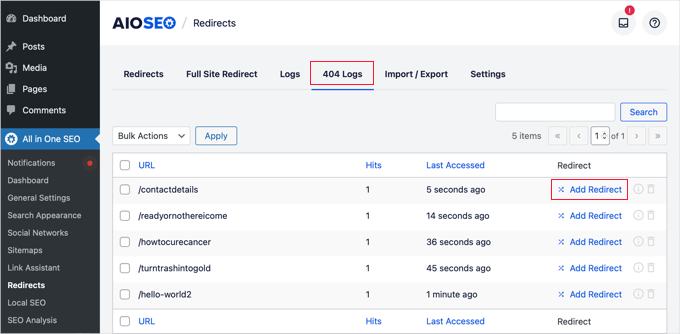
Speaking of 404 errors, two of the most common self-inflicted traffic drops happen when users change their permalink structure or delete old content.
If you recently changed your URLs (permalinks) without setting up proper 301 redirects, then Google can no longer find your pages, and your content will disappear from search results.
Similarly, deleting old content, especially pages that previously ranked well or had backlinks, will result in an immediate loss of traffic.
If you must change a URL or delete a post, always use a redirection manager, like the one in AIOSEO, to point the old link to a relevant new page or your homepage so you don’t lose that valuable SEO ranking power.
Test Your Website Speed
Another technical issue to check is your website’s load time. If a recent plugin update or theme change drastically slowed down your site, then Google may lower your rankings due to poor Core Web Vitals. People hate slow websites, and search engines do too.
You can test your current website speed using a free tool like Google PageSpeed Insights.
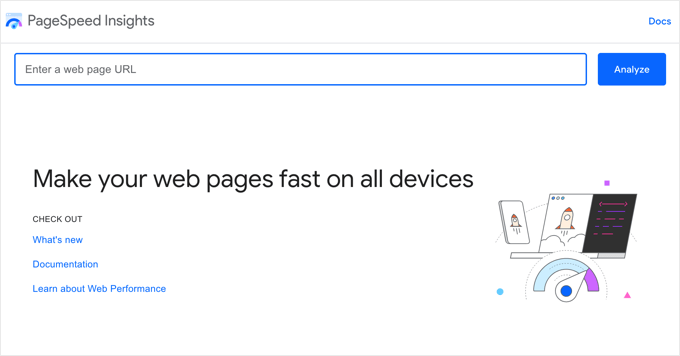
If your score has suddenly dropped, you may need to install a caching plugin or optimize your images. For step-by-step instructions, see our ultimate guide to boost WordPress speed and performance.
Find Other Hidden Blocks and Issues
Accidentally blocking search engines is one of the most common causes of a sudden traffic drop.
These invisible blocks can happen in your global WordPress settings, on individual pages, or through server-level password protection.
To learn where all of these hidden switches are located so you can ensure they are turned off, see our complete guide on how to stop search engines from crawling a WordPress site.
If you have checked these common culprits and still can’t find the issue, you may have a deeper underlying problem. To run a complete diagnostic check of your site’s foundation, see our technical WordPress SEO framework checklist.
Step 5: Verify Your Indexing Status
Sometimes your site is still live, but Google has decided to stop showing certain pages in search results. This often happens because Google isn’t crawling your website efficiently.
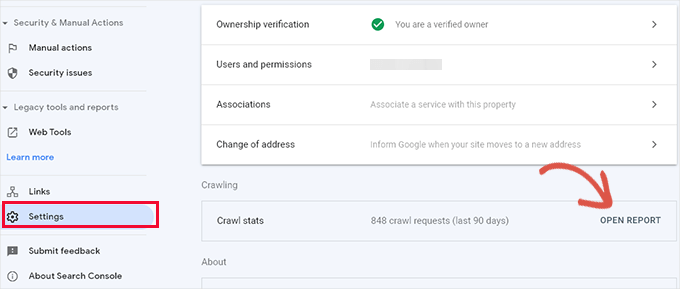
You can check this using the Google Search Console account you set up earlier. In the left-hand menu, click ‘Settings’ and then click ‘Open Report’ next to ‘Crawl stats’.
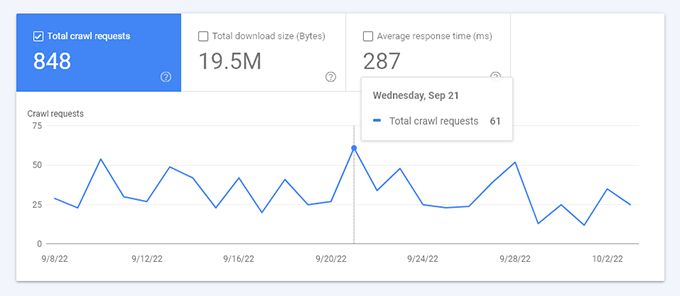
This report shows an overview of how many times Google bots request pages from your site.
If you look at the breakdown and see that Google is spending its time crawling 404 errors or RSS feeds instead of your actual articles, it means Google is struggling to read your site.
This is known as a ‘Crawl Budget’ problem.
WordPress automatically generates hundreds of extra URLs in the background (like author feeds or category tags). If you don’t manage them, then Google wastes its daily crawling budget on these low-value links instead of discovering your real content.
To fix this, you need to clean up these extra URLs so Google can focus on your most important pages. You can do this easily using the advanced Crawl Cleanup feature available in the premium versions of All in One SEO.
To see exactly how to find these wasted links and safely turn them off, see our tutorial on the WordPress SEO crawl budget problem and how to fix it.
Step 6: Scan for Malware and Hacked Content
If you have followed the steps above and still haven’t found the cause, then your site may have been compromised. Hackers often launch ‘SEO Spam’ attacks where they inject junk links into your old posts.
Google will notice and drop your rankings as a result.
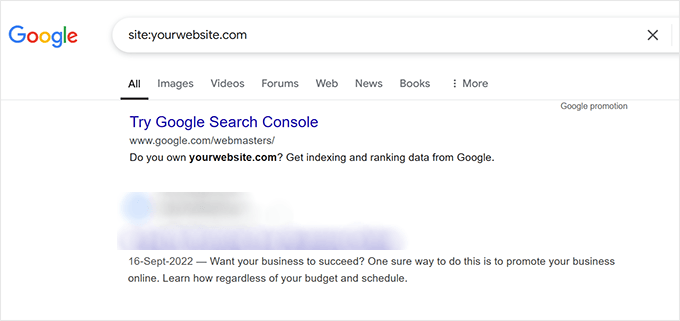
You can do a quick manual check by typing site:yourdomain.com into a Google search. If you see foreign characters, pharmaceutical keywords, or strange titles in your search results that you didn’t write, then your site has been hacked.
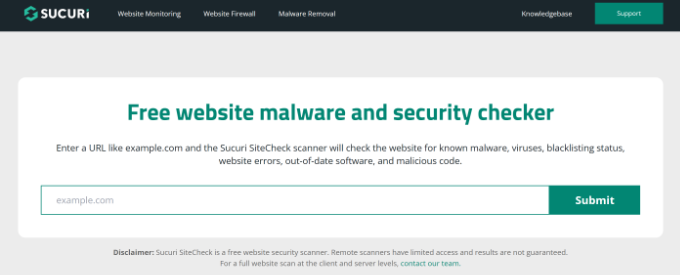
For hidden hacks like this, you should run a thorough scan of your site using a security tool like Sucuri.
It is a tool we trusted for years to find malicious code and unauthorized redirects that only show up for certain visitors, such as those on mobile devices.
You should also check Users » All Users in your dashboard to ensure no unauthorized admin accounts have been created.
If you suspect your site is infected, you will need to scan your core files, themes, and plugins to isolate the malware.
For a complete walkthrough of the best security scanners, see our guide on how to scan your WordPress site for potentially malicious code.
Warning: Cleaning your WordPress database and replacing core files are highly destructive actions. Always create a complete backup of your website before proceeding. This will allow you to restore your site if anything goes wrong.
If your scan reveals SEO spam, simply deleting the visible text on your pages won’t work.
You will need to clean your WordPress database, replace infected theme files with fresh copies, and reset all your passwords.
For step-by-step instructions on this cleanup process, see our tutorial on how to find and remove spam link injection in WordPress.
Step 7: Monitor Your Recovery With Site Notes
Once you have identified the problem that was preventing traffic to your website and fixed it, the final step is to monitor your site as it recovers.
You should not expect traffic to bounce back instantly. It can take Google several days or even weeks to recrawl your site and update your rankings.
Expert Tip: You can ask Google to recrawl your website by following our guide on how to ask Google to recrawl URLs on your WordPress site.
The best way to keep an eye on your progress is by using the Site Notes feature in MonsterInsights.
Adding a new note creates a clear timestamp on your Insights » Reports overview. You can even do this directly from the WordPress content editor the moment you hit ‘Update’ on a fixed page.
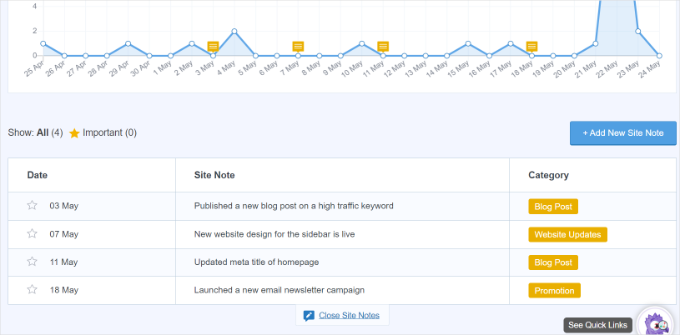
Checking this chart daily helps you see exactly when your traffic starts to trend upward again, proving that your fixes worked.
You can check your notes to see exactly what changed on that day.
For a detailed walkthrough on how to set this up, see our guide on how to get GA4 site annotations and notes in WordPress. It will show you how to manage your annotations, customize your categories, and add notes directly from your reports or the post editor.
Frequently Asked Questions About WordPress Traffic Drops
When your website traffic disappears, it is natural to have questions about what went wrong and how long it will take to see a recovery.
Here are some of the most common questions our readers ask about diagnosing and fixing traffic drops in WordPress.
1. How long does it take for website traffic to recover?
The recovery time depends entirely on the cause of the drop. If the issue was a simple technical error, such as accidentally blocking search engines in your WordPress settings, you may see your traffic return within a few days of fixing it.
However, if your site was affected by a major Google algorithm update, it can often take several weeks or even months of consistent content improvements before your rankings fully stabilize.
2. Can changing my WordPress theme or updating plugins cause a traffic drop?
Yes. Changing your theme can impact your traffic if the new theme is slower, lacks mobile optimization, or uses a different heading structure (like changing H1 tags to H2 tags). Similarly, plugin updates can sometimes cause conflicts.
This is why we recommend using the Site Notes feature in MonsterInsights to create a timeline of your changes, allowing you to easily see if a drop aligns with a specific update.
3. Can losing backlinks cause my traffic to drop?
Yes. Backlinks (links from other websites pointing to yours) are a major ranking factor for Google. If a high-authority website recently removed a link to your page, or if a site linking to you was penalized, your page might lose its ranking power.
You can use SEO tools to monitor your backlink profile and see if a sudden loss of links correlates with your traffic drop.
4. What if my traffic dropped, but my Google rankings stayed the same?
If your tracking is working and your rankings haven’t changed, but your traffic is still down, user behavior may have shifted. Sometimes, people simply stop searching for a specific topic due to changing seasons or passing trends.
You can plug your main keywords into a free tool like Google Trends to see if the overall public interest in your topic has naturally declined.
Moving Forward: Keeping Your WordPress Traffic Healthy
I hope this article helped you understand why your WordPress site lost traffic and how to get it back. Now that you’ve navigated the immediate crisis and gotten your traffic back on track, you’re in a much stronger position.
Use the lessons you learned here to keep your WordPress site healthy and growing. To help you build on this success and ensure your rankings stay strong, here are some additional resources:
- The Ultimate WordPress SEO Guide – This is our most comprehensive roadmap to ensuring your site is fully optimized for search engines from top to bottom.
- Best WordPress SEO Plugins and Tools That You Should Use – Once you have recovered your traffic, these tools can help you find new keyword opportunities and track your competitors.
- How to Monitor Your WordPress Website Server Uptime – Technical downtime is a silent killer of website traffic. This guide teaches you how to set up free automated alerts so you know the exact minute your site goes offline, allowing you to fix it before you lose visitors and SEO rankings.
- Proper WordPress Update Order – Many traffic drops happen right after a messy update. This tutorial teaches you the exact order to safely update your core software, plugins, and themes to avoid breaking your site.
If you liked this article, then please subscribe to our YouTube Channel for WordPress video tutorials. You can also find us on Twitter and Facebook.
The post Why Your WordPress Site Lost Traffic (And How to Get It Back) first appeared on WPBeginner.

Trade of the day: GBPCHF (16.04.2026)
Facts
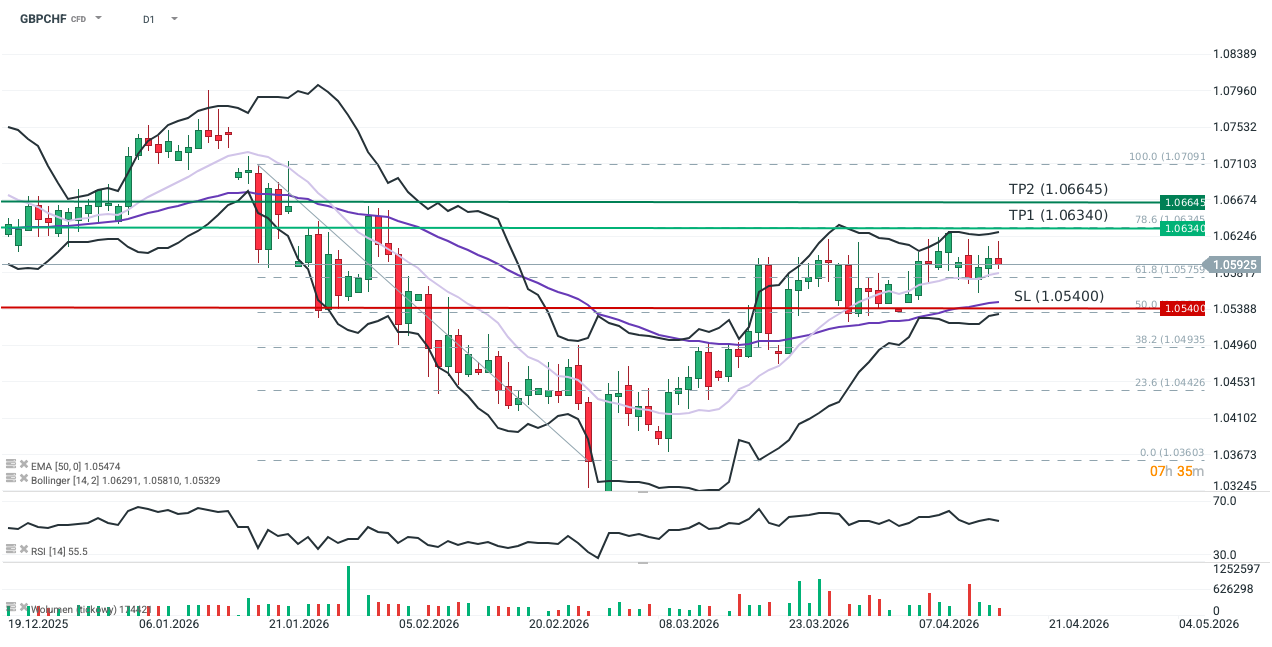
- GBPCHF pair moved back above the 14-day exponential moving average (EMA14; light purple) yesterday, despite a brief dip below 1.058 during the early session.
- One week Risk Reversal indicator has reached its highest level since July 2024.
- RSI is currently oscillating between 50 and 60.
Recommendation
- Long Position (BUY) at market price in GBPCHF
- Target Prices (Take Profit): 1.06340 (TP1), 1.06645 (TP2)
- Stop Loss (SL): 1.05400
Source: xStation5
Opinion
The GBPCHF sell-off triggered by the outbreak of conflict in the Middle East capped months of Sterling weakness, driven by growth concerns and expectations of UK rate cuts. Approximately one week after the US and Israeli strikes on Iran, the pair initiated an upward trajectory. This shift is supported by the UK’s significant exposure to surging natural gas prices, which increases the risk of an inflationary rebound and a return to interest rate hikes.
Following a correction earlier this week, the pair is gradually rebounding, confirming the ongoing trend. While the UK still faces a high risk of stagflation, today’s GDP data (+0.5% m/m; exceeding the Reuters consensus of 0.1%) has somewhat cooled recession fears amid energy price inflation. Growing optimism is also reflected in the options market: the 1-week Risk Reversal is at its highest since July 2024, indicating a decrease in hedging demand against Sterling declines (i.e., fewer PUT options).
Sterling should remain supported against the Franc in the short term, regardless of further developments in the Strait of Hormuz. In an escalation scenario, concerns over energy price pressure would exert symmetrical pressure on the Bank of England to resume rate hikes (the market currently prices one 25 bps hike for September). Conversely, de-escalation would reduce fears of economic stagnation and dampen demand for safe-haven assets, including the Franc. It is worth noting that the Franc also lost ground against the Dollar in March, suggesting it was not the primary choice for investors seeking a “safe harbor” for capital.
Methodology
This recommendation was prepared based on a technical analysis of the GBPCHF chart and a fundamental analysis of the respective economies (focusing on UK monetary policy).
- Directional Bias: Established using moving averages, price action, and market expectations regarding central bank responses to the Middle East conflict.
- Exit Strategy: Target and Stop Loss levels were determined using Fibonacci retracements of the latest downward leg, Bollinger Bands, and Price Action. TP1: Set at the 78.6% Fibonacci level, coinciding with the upper Bollinger Band on the 14-day interval. TP2: Set at the resistance level established between February 2nd and 3rd. Stop Loss: Placed at the 50% Fibonacci level, which coincides with the lower Bollinger Band and the 50-day EMA.
- TP1: Set at the 78.6% Fibonacci level, coinciding with the upper Bollinger Band on the 14-day interval.
- TP2: Set at the resistance level established between February 2nd and 3rd.
- Stop Loss: Placed at the 50% Fibonacci level, which coincides with the lower Bollinger Band and the 50-day EMA.

EUR/CAD caps near 1.6200 as Euro struggles due to risk-off mood
- EUR/CAD stays silent as risk aversion rises following the failure of US–Iran peace talks.
- Nordea analysts say resolving the US–Iran conflict wouldn’t remove the need for ECB tightening.
- CAD may gain as oil prices rise amid renewed fears of a Strait of Hormuz blockade.
EUR/CAD holds position after paring its intraday losses, trading around 1.6200 during the Asian hours on Monday. However, the currency cross still remains in the negative territory as the Euro (EUR) struggles amid increased risk aversion after the failure of the United States (US)-Iran peace talks.
US Vice President JD Vance confirmed the US–Iran talks in Islamabad ended without a deal following 21 hours of negotiations. President Donald Trump confirmed on Truth Social that the blockade of ships entering and exiting Iranian ports will begin today, April 13, at 10:00 AM ET (14:00 GMT).
Eurozone annual inflation rose to 2.5% in March, the highest since January 2025, exceeding the European Central Bank’s (ECB) 2% target amid rising energy prices. ECB President Christine Lagarde emphasized that policy will remain restrictive until inflation sustainably returns to target.
Nordea’s Jan von Gerich and Tuuli Koivu, in their pre-ceasefire ECB outlook, projected four 25-basis-point rate hikes starting in June. They emphasize that broader price pressures persist and that even a resolution to the conflict would not eliminate the need for ECB tightening.
The EUR/CAD cross also struggles as the commodity-linked Canadian Dollar (CAD) may receive support from the rising oil prices, given Canada’s status as the largest crude exporter to the United States (US).
West Texas Intermediate (WTI) oil price trades over 7% higher near $96.90 per barrel at the time of writing. Crude oil prices rise as US–Iran tensions re-escalate and fears grow over a potential Strait of Hormuz blockade.

Scenario Analysis – What to expect from weekend peace talks
Markets are in a jubilant mood as we lead up to the weekend. Spurred by a milder March reading of US inflation than expected, rate cut expectations are building, and stocks are rallying. Headline CPI in the US rose at a 3.4% annual rate, a hefty jump from the 2.4% rate in February, but lower than the 3.5% expected core prices rose by a 2.6% annual rate, also weaker than expected. The BLS reported that the index for energy rose by 10% in March, driven by a 21% rise in the price of gasolene.
US price growth not as bad as feared
The jump in gasolene prices accounted for three quarters of the rise in inflation last month, according to the BLS. Airline fares also rose sharply last month, but this was partly offset by a drop in medical costs and in used car prices. Today’s data suggests two things: 1, the inflationary impact from this crisis has been huge, but it is offset by weaker inflation growth elsewhere, such as a moderate increase in shelter costs, a drop in the cost of utilities and no change in food prices last month. 2, if the Strait of Hormuz is not reopened soon, then the impact on inflation could spread to food prices and to core inflation, which typically takes longer to absorb energy price shocks.
The immediate market reaction has been relief. A higher-than-expected reading for inflation could have spooked financial markets as we lead up to the weekend. Instead, this supports current expectations of a rate cut from the Federal Reserve by year end, which is boosting the market mood.
Markets optimistic about peace talks
Some concrete economic data that quantifies the effect of the war as being less onerous than first anticipated, combined with hopes for successful peace talks is helping US stocks to extend their longest winning streak this year. Rather than selling stocks on a Friday in case of an escalation of the conflict in the Middle East over the weekend, the market is willing to ‘give peace a chance.’
Stocks have strong week, as dollar reverses course
The dollar is weaker across the board on Friday after the lower-than-expected US inflation print, which is boosting hopes of a rate cut from the Fed. However, the bond market is less enthusiastic, and bonds are selling off across Europe after Forties crude from the North Sea reached a fresh record high above $147 per barrel. Until the Strait of Hormuz is fully open and Gulf energy infrastructure is operational, the bond market is likely to trade with a more cautious tone compared to stocks.
Stocks are on course for their best weekly performance of the year so far, as you can see below, and this has been spurred by the market’s conviction that President Trump will continue with a ceasefire and the conflict in the Middle East is now at its end stages. The Trump reversal index is now back at levels last reached before the war started. The market is pricing for a positive outcome from the negotiations between the US and Iran this weekend, below, we assess potential outcomes from this weekend’s talks and their impact on financial markets:
Peace talks, assessing the potential outcomes
1, Positive outcome: The two sides agree to reopen the Strait of Hormuz, which leads to an immediate reopening of the waterway. An even better outcome would be one without tariffs to pass through the Strait. The oil price is likely to fall back to pre-war levels for Brent, between $75 and $80 per barrel, stocks could surge and bonds will also rally, leading to another sharp decline in global bond yields. We believe there is a low probability, 30% or less, of this perfect outcome happening straight away.
2, Moderate outcome: The negotiations end without a deal, but more talks are expected. The prospect of prolonged negotiations could knock sentiment at the start of next week, but any weakness could fade if there are continued pledges to work towards a lasting peace. While stocks may extend this week’s rally, a high oil price could stymie further gains, especially if there is no concrete plans to reopen the Strait of Hormuz. We think that this is the most likely outcome and think there is a 70-80% chance that further talks will be needed.
3, Negative outcome: The talks fail, both sides walk away and the bombing in Iran and around the Gulf resumes. This could see the oil price reach fresh highs above $120 per barrel for Brent, stocks will tank and bond yields will surge. We believe that this is also a low probability outcome, with 10-15% chance.
Overall, the outcome of negotiations are the main focus for markets as we end the week.
Chart 1: S&P 500, weekly performance chart 1 year
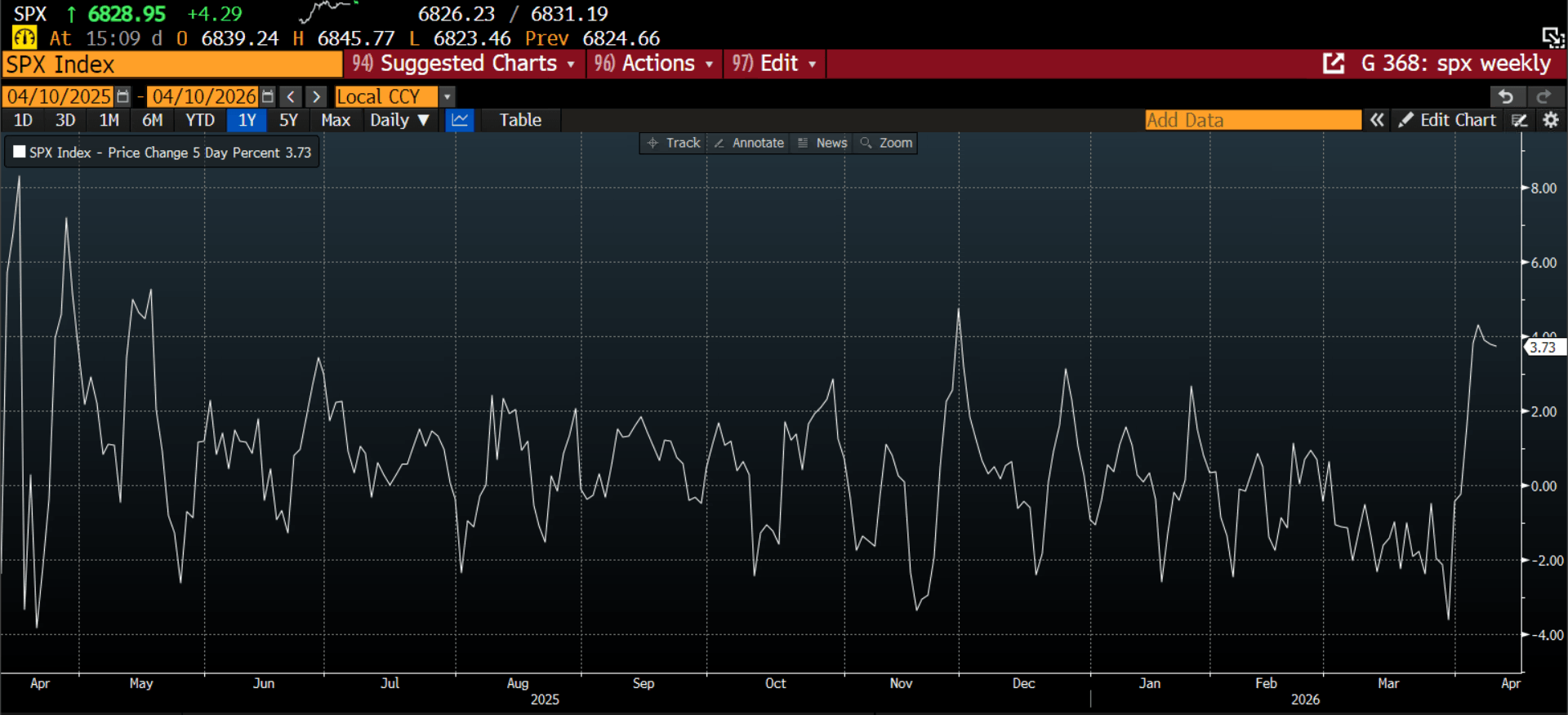
Source: XTB and Bloomberg
The material on this page does not constitute financial advice and does not take into account your level of understanding, investment objectives, financial situation or any other specific needs. All information provided, including opinions, market research, mathematical results and technical analyzes published on the Website or transmitted To you by other means, it is provided for information purposes only and should in no way be construed as an offer or solicitation for a transaction in any financial instrument, nor should the information provided be construed as advice of a legal or financial nature on which any investment decisions you make should be based exclusively To your level of understanding, investment objectives, financial situation, or other specific needs, any decision to act on the information published on the Website or sent to you by other means is entirely at your own risk if you In doubt or unsure about your understanding of a particular product, instrument, service or transaction, you should seek professional or legal advice before trading. Investing in CFDs carries a high level of risk, as they are leveraged products and have small movements Often the market can result in much larger movements in the value of your investment, and this can work against you or in your favor. Please ensure you fully understand the risks involved, taking into account investments objectives and level of experience, before trading and, if necessary, seek independent advice.

Trade of The Day – CHF/JPY
Facts:
The pair reached the lower limit of 1:1 structure at 199.45
Main trend on the pair remains upward from March 2025
Recommendation:
Trade: Long position on CHFJPY at market price
Target: 203.68, 205.65
Stop: 197.58
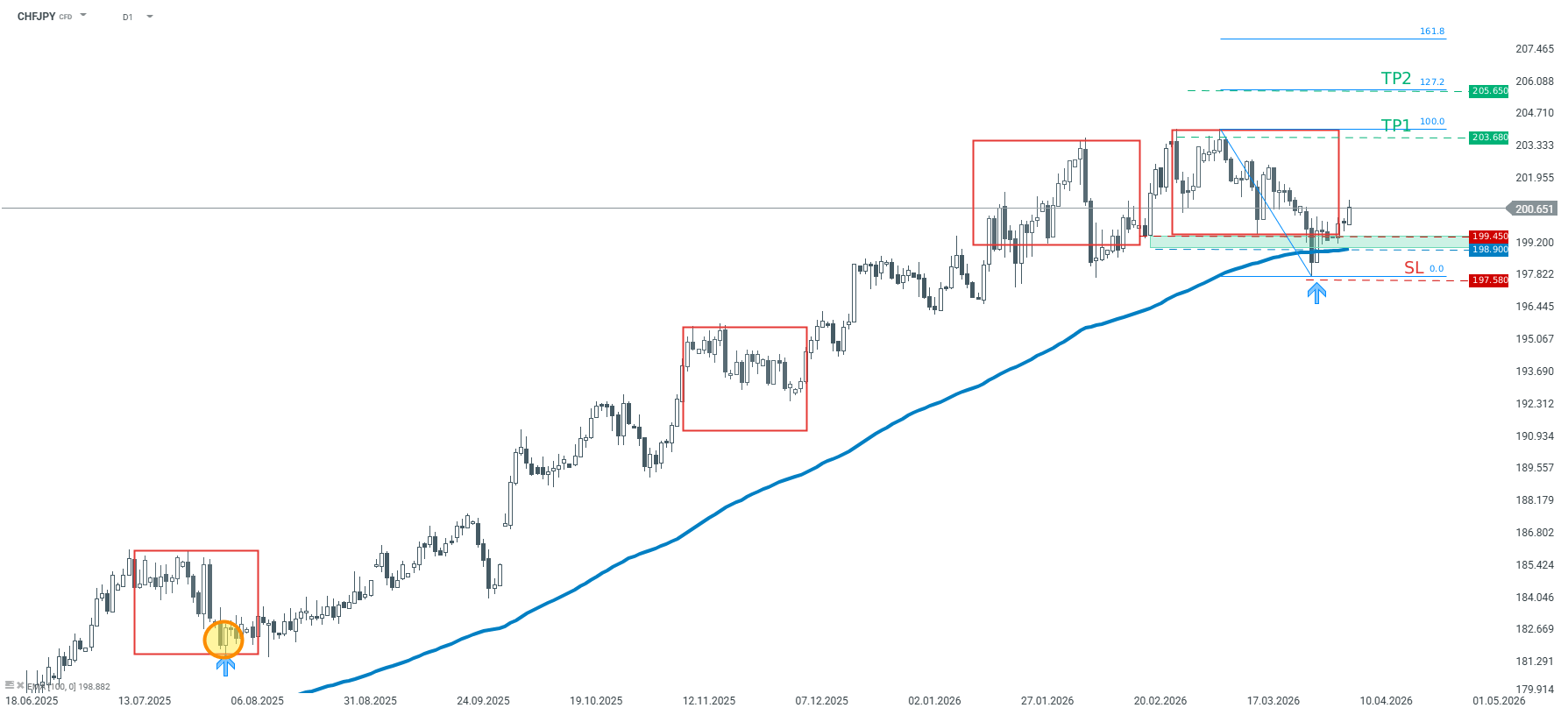
Opinion: Looking at CHFJPY chart, one can observe that the price bounced off the key technical support today. This support is marked with the lower limit of 1:1 structure (red rectangles) as well as 100-period moving average from D1 interval. Should buyers manage to hold the price above the support at 199.45, another upward impulse may be on the cards. We recommend taking a long position on CHFJPY at market price with two targets: 203.68 and 205.65. We also recommend placing a stop loss order at 197.58 Source: xStation5